
Approve and sign safely
How to read a signing request in Morsel. Chain proof, the simulation of what will leave and enter your wallet, risk warnings, batches, messages and sign-in requests.
Every transaction a site asks for comes to you first. Morsel runs it as a dry run and shows what would actually happen, so you can trust the preview over the site's own description.
The four things to check
- Who's asking. The site's name and exact domain at the top.
- Which network. Cookie Chain or Solana, and whether Morsel confirmed it.
- What changes. You send and You receive.
- Which wallet. The account card at the bottom.
If anything is a surprise, tap Cancel. The site can't continue without you.
Chain proof
A site can claim a transaction is for one network while building it for the other. Morsel doesn't take its word for it. Before showing you anything, it tests the transaction against both Cookie Chain and Solana. Only the network it was really built for accepts it.
When that works, the request shows a chip such as Cookie Chain confirmed. The fee, the preview and where the transaction is sent all follow the confirmed network.
The preview
Morsel simulates the transaction on the network without sending it. It costs nothing.
- Simulated · succeeds means the dry run worked. You send (in red) and You receive (in green) show exactly how your balances would change.
- Network fee is an estimate.
- Simple payments show as a payment: the amount, To, Total and a Pay button.
- A memo shows as Public · anyone can read it on-chain.
- Details lists the programs involved (green for known ones), the instructions, who pays the fee, and the compute used.
If the preview fails, Morsel says This may fail and why, or Simulation unavailable when it couldn't preview at all. You can still approve, but only if you understand why. A transaction that fails on the network can still cost the fee.
Risk warnings
Morsel looks for the patterns drainers use.
| What Morsel sees | What happens |
|---|---|
| Unlimited permission to spend a token | Blocked. You can't approve it. |
| A change of who controls a token or account | Blocked. |
| Limited permission to spend a token | You must tick I understand the risk and press and hold Hold to confirm. |
| Sending more than 2 SOL | Tick I understand the risk, then hold to confirm. |
| Closing token accounts, or touching many accounts | A note to read. |
| You pay a fee and receive nothing | You pay the network fee and receive nothing in return. |
Several transactions at once
Some sites need several transactions signed together. Morsel lists each one with its own preview and warnings. Tick I reviewed all [n] transactions, then tap Approve all. If any one of them can't be read or is unsafe, Morsel blocks the whole set: One of these can’t be approved.
Signing a message
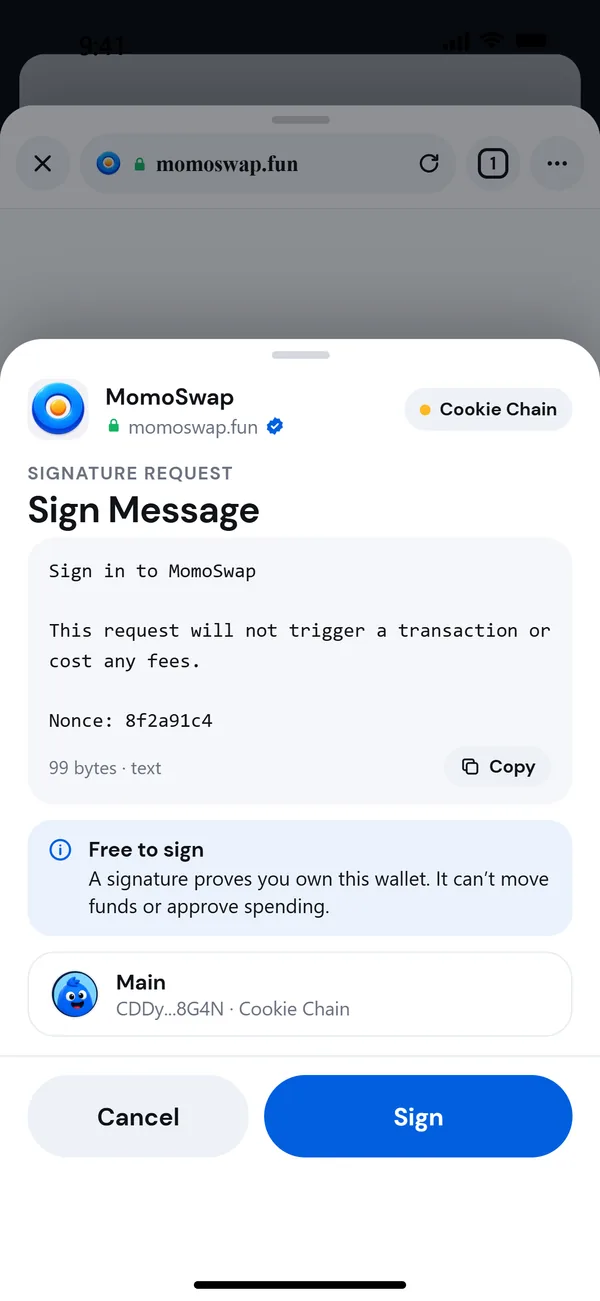
Sites ask you to sign a message to prove you own a wallet, for example to sign in. Sign Message shows the text.
- Free to sign: a signature proves you own this wallet. It can't move funds or approve spending.
- This isn’t readable text: only sign it if you know what it is.
If a site tries to pass off a transaction as a "message", Morsel refuses to sign it.
Sign in with Solana
Sign-in requests show Sign in to [site] with the Website, Account, Network and Expires.
- Matches this site means the sign-in is for the site you're on.
- Different site means it's for another site. Morsel asks you to tick I trust [site] and hold to sign. If you didn't expect this, cancel.
- A sign-in for a different wallet, or one that has expired, can't be signed.
Confirming
On iPhone and Android, Morsel asks for Face ID, your fingerprint or your passcode on every approval. A request that waits more than 3 minutes expires, and leaving the page cancels it.
On the Chrome extension
The extension shows requests in its own window: Sign Transaction or Sign Message, a simulation result (Simulation passed, likely to succeed or This transaction is likely to fail), Your balance change, the network, the programs and the fee. Approve with SIGN or Approve Transaction, or tap REJECT.
The extension's request window is simpler than the phone's: it doesn't show chain proof, risk blocks or batch review. Take extra care, and check Your balance change every time. For important transactions, you can use the phone app instead through a QR connection. See Connect to a dApp.