
Home
A tour of Home and the rest of Morsel. The header, the dock, your balance, the actions, and every section from tokens to recent activity.
Home is your wallet at a glance, on the network you're on. Here's what everything does, from top to bottom.
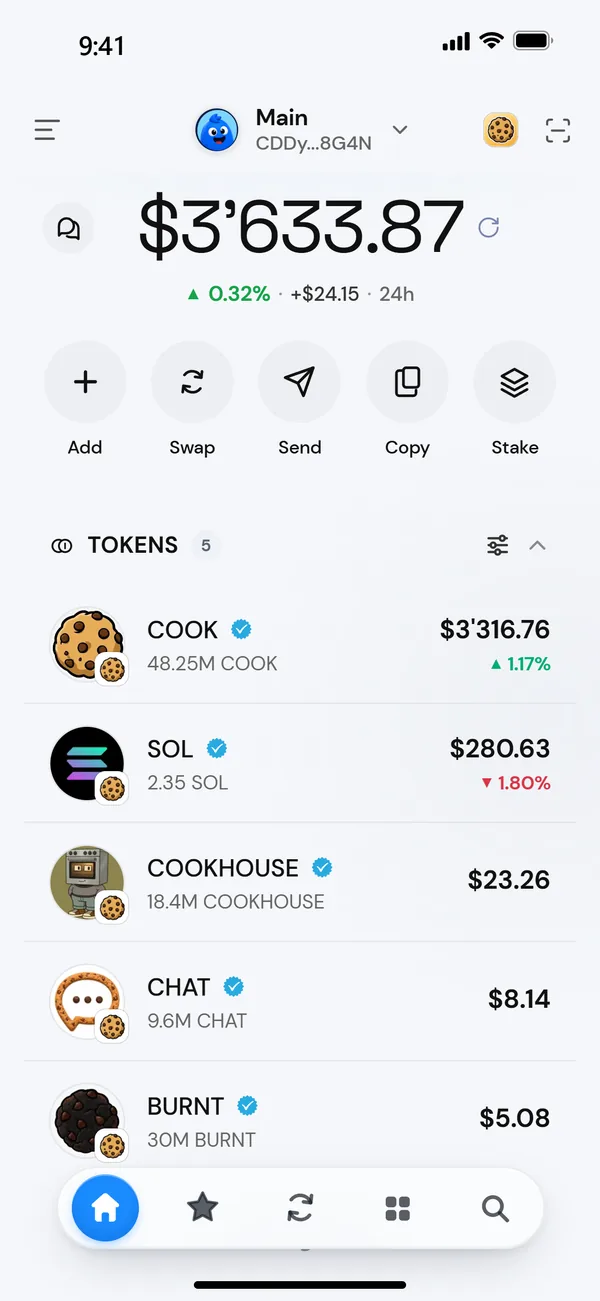
The header
| Where | What it does |
|---|---|
| Menu icon, left | Opens Settings. |
| Your wallet, middle | Tap the address to copy it. Tap anywhere else to open the wallet picker: switch wallets, turn on Private Mode, Add Funds, or Add new wallet. |
| Network button, right | Shows the network you're on. Tap to switch. See Switch networks. |
| Scan button, right | Scan an address to pay it, or a Morsel connect code. iPhone and Android only. |
| Side panel button, right | Moves the extension between the popup and Chrome's side panel. Extension only. |
The dock
The dock at the bottom has four tabs and search.
| Tab | What's there |
|---|---|
| Wallet | Home, the screen on this page. |
| Stash | Trending tokens, your collectibles, DeFi and ways to earn. See Stash. |
| Swap | Swap, Limit and Bridge. See Swap tokens. |
| Apps | dApps that open in Morsel's browser. See Use the browser. |
| Search | Search tokens, apps, collections, wallets and names, or speak. See Search and voice. |
Tap the tab you're already on to jump to the top. Tap it again at the top to refresh.
Your balance
The big number is the value of everything this wallet holds on this network, in your currency. Under it is the change over the last 24 hours.
- Refresh: tap the refresh button next to the balance, or pull down on iPhone and Android. Morsel also refreshes by itself while you're looking.
- Hide it: tap the balance. Amounts turn into dots across Morsel. See Hidden Balances.
The actions
| Action | What it opens |
|---|---|
| Add | Receive, or bridge funds in from the other network. |
| Swap | The Swap tab. |
| Send | The send sheet. See Send tokens. |
| Copy | Copies your address. |
| Stake | Staking on this network: COOK on Cookie Chain, SOL on Solana. |
When you scroll down, a slim bar with your balance and Copy, Send and Add stays at the top.
Cards that come and go
- Back up your wallet appears under the balance until you've backed up this wallet. Tap it. See Your Secret Recovery Phrase.
- Get COOK appears on Cookie Chain while you hold no COOK. It offers Bridge from Solana, Swap for COOK and Receive.
- New messages show as a strip under the actions when a chat is unread. The chat bubble on the balance card shows the count. See Start a chat.
- Bridges in progress show here until they arrive.
Your sections
A new wallet shows only the balance and actions. The sections appear once you hold something.
- Tokens. Everything you hold on this network, by value. Tap one for its chart and details. See Tokens.
- Positions. Your DeFi and staking. See Positions.
- Collectibles. Your NFTs by collection. See Your collectibles.
- Recent activity. Your last transactions. Tap View more for your full history. See Activity.
Tap a section title to fold it away.