
Stash
The Stash tab brings trending tokens, your collectibles, your DeFi and ways to earn together, for the network you're on.
The Stash tab is where you discover what's moving and see everything you hold beyond plain balances.
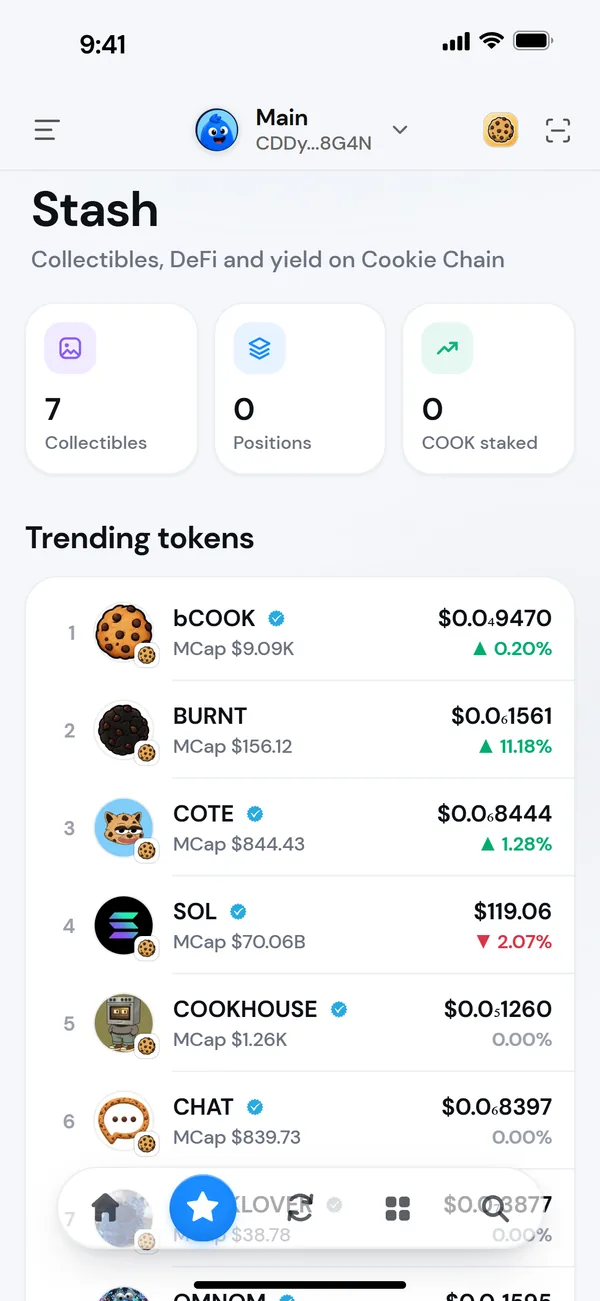
At the top
Three tiles sum up what you have on this network:
- Collectibles: how many you hold. Tap it to browse them all. See Your collectibles.
- Positions: the value of your DeFi positions.
- COOK staked or SOL staked: tap it to open staking. See Stake COOK.
Trending tokens
What people are trading right now, with each token's market cap, price and 24-hour move. Badges show which tokens are Verified or a Known ecosystem token.
- On Cookie Chain, the list is the most recently traded tokens, in the same order as swap.cookiescan.io.
- On Solana, it's Jupiter's trending list over 24 hours, verified tokens only, without stablecoins or staked SOL.
Tap a token to open its chart and details, then Buy or Swap from there. The list refreshes on its own.
DeFi
Your positions across protocols, the same as on Home. See Positions.
Earn
A card for native staking on this network, then more ways to put your tokens to work. Tap View all for the full list.
- On Cookie Chain: staking COOK with a validator, liquid staking with Bake Your Stake, lending COOK on Aera Lend, and earning trading fees on CookieSwap and CookieBox.
- On Solana: staking SOL, liquid staking tokens like JitoSOL, jupSOL, mSOL and INF, and lending and liquidity on protocols such as Kamino, Jupiter Lend, Project 0, Save, Orca, Raydium and Meteora.
Apps open in Morsel's browser, where you connect and approve each transaction yourself. They're run by third parties, with their own risks. Read their docs before you deposit.
Rewards
On Cookie Chain, Rewards shows the ways Morsel rewards you, such as the Genesis Pass.