
Your collectibles
Browse your NFTs on Cookie Chain and Solana, pin favorites to your Showcase, open an NFT's details, and use one as your profile picture.
Your NFTs show on Home under Collectibles and in the Stash tab, for the network you're on.
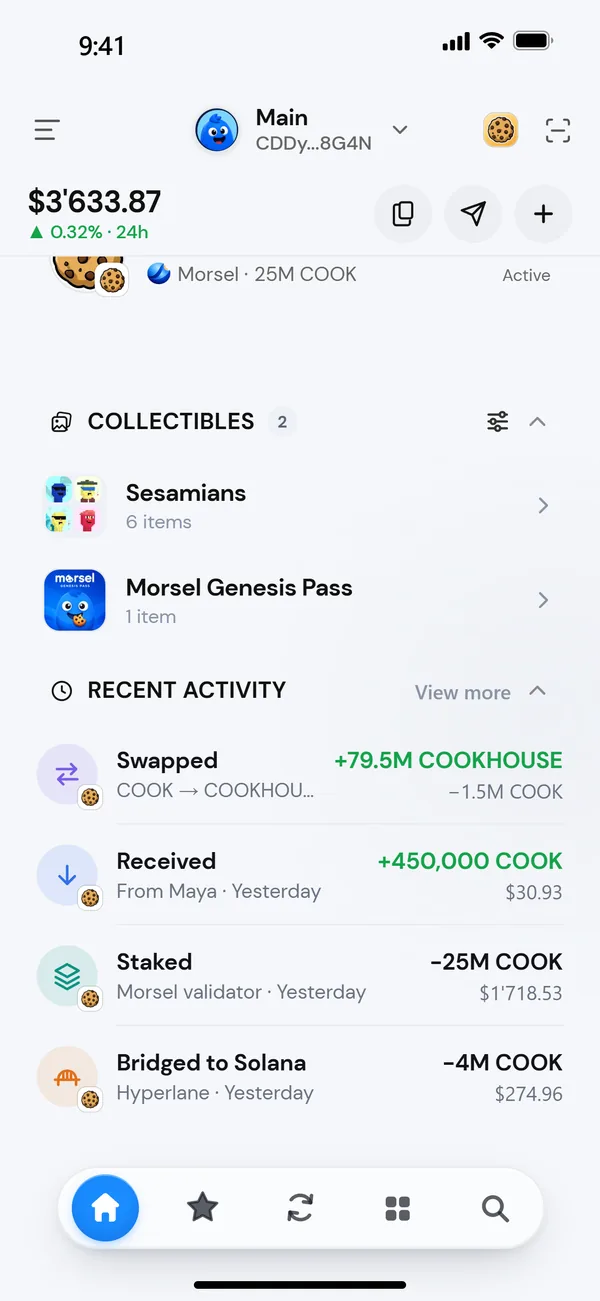
On Home
Collectibles lists one row per collection, with how many items you hold, biggest collection first. Tap a row to open it and see the items.
- Tap the star on an item to Add to Showcase. Showcase items are pinned in their own group at the top.
- Tap an item to open its details.
In the Stash
Tap the Collectibles tile in Stash to browse everything in one sheet.
- Search with Search collections and items.
- Switch between Collections and All items.
- Sort collections by Most items or A–Z.
An NFT's details
Tap any NFT to open it.
- Send: see Send an NFT.
- Baked Bazaar on Cookie Chain: opens the NFT on Baked Bazaar, the Cookie Chain NFT marketplace, where you can list it for sale. See Sell on Baked Bazaar.
- View on explorer on Solana.
Below, you'll find the Collection, its Floor price, the Symbol, Token standard and Creator royalty, then the Owner, Creator and Mint address (tap to copy), the Properties and About.
The ⋯ menu has Copy mint address, View on explorer, Hide collection and Burn NFT.
Use an NFT as your profile picture
- Open Settings and tap your wallet card at the top, or tap the pencil next to the wallet in the wallet picker.
- Tap Profile picture, then Use one of your NFTs.
- Tap the NFT you want. It's saved straight away.
Don't see an NFT?
- Check the network. Solana NFTs only show while you're on Solana.
- Check Hidden. Morsel hides collections it can't verify. Scroll to the bottom of Collectibles and tap Hidden ([n]). See Hidden and unverified NFTs.
- Give it a minute. A newly bought NFT can take a moment to appear. Pull to refresh.