
Trade perpetuals
Go long or short with leverage on crypto, stocks, commodities and more. Open a position, set a stop loss and take profit, close it, and read the numbers that matter.
A perpetual (a perp) lets you bet on a price going up or down without owning the asset. With leverage you control a position bigger than the money you put in. That magnifies gains and losses alike.
Find a market
Go to the DeFi tab and stay on Perps. The list shows each market's price and 24-hour move.
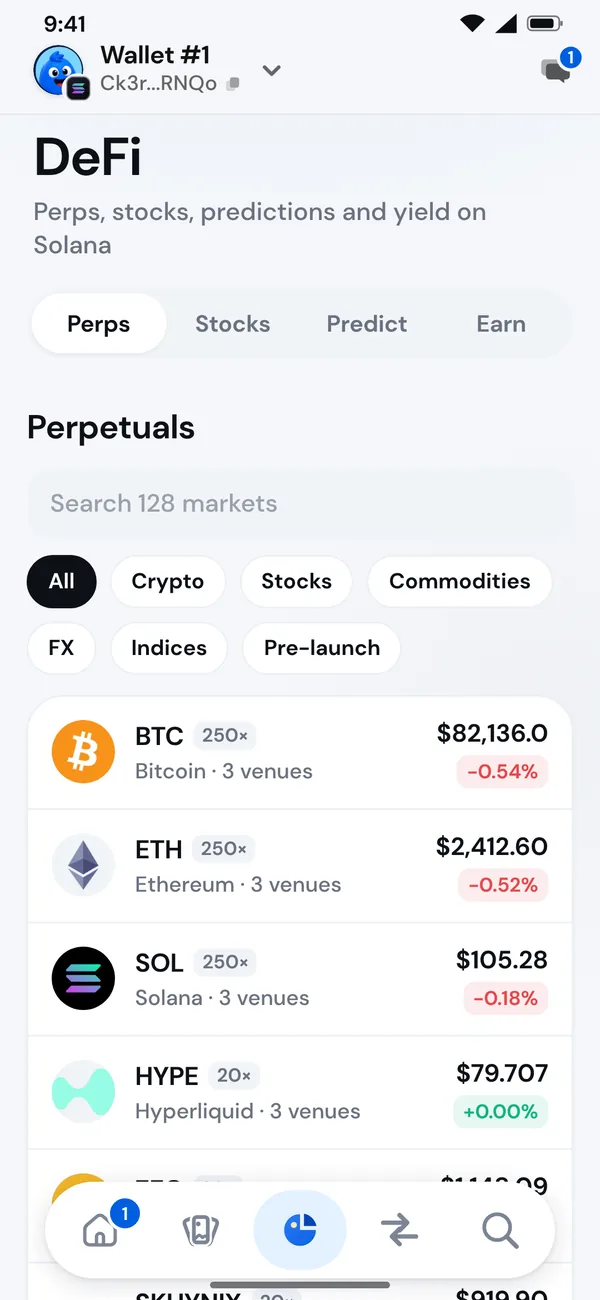
- Search by name or symbol.
- Filter with Crypto, Stocks, Commodities, FX, Indices or Pre-launch.
- The badge, such as 250×, is the most leverage the market allows. 3 venues means the market is listed on three venues.
- Tap Show more at the bottom for the rest.
Stock and commodity markets follow their exchanges' hours. When the exchange is closed, a market can be limit-orders-only, show a band price or be closed until it opens.
Open a position
- Tap a market. If more than one venue lists it, Morsel opens the one you already trade it on, else the last one you picked, else one where you have funds. Change it at the top of the sheet. You see the venue's chart, Mark price, 24h high / low, 24h volume, Open interest and Funding or Borrow fee.
- Tap Long if you expect the price to rise, Short if you expect it to fall.
- Choose Market to trade at the current price, or, on venues that take limit orders such as Jupiter, Limit and enter a Limit price.
- Under You pay, enter How much you want to put in, or tap Max. On Pacifica and Phoenix it comes out of your venue account; Morsel tops the account up from your wallet first if it's short.
- Set Leverage. Morsel shows the Position size, the Liquidation price, the Entry price and the Fees before you confirm.
- Optionally set Take profit and Stop loss (see below).
- Tap the button, review it and confirm. It shows Sign, Send and Filled by the venue as it goes. Orders usually fill in seconds.
If you already hold a position on that market, a new order on the same side adds to it. An order on the other side first reduces it.
Take profit and stop loss
- Take profit closes the position when the price reaches a level in your favour.
- Stop loss closes it when the price reaches a level against you, before you're liquidated.
A take profit must sit on the right side of the price, and a stop loss on the wrong side of the price but before the liquidation price. Morsel tells you if one doesn't. You can set or change them later from the position. Not every venue or order type supports them.
Your position
Open positions show under Your positions, with:
- Entry and Liquidation prices and how far you are from liquidation.
- PnL, your profit or loss so far, before fees on close.
- Size, Collateral and Leverage.
Tap one to manage it:
| Action | What it does |
|---|---|
| Add collateral | Lowers your leverage and moves the liquidation price away. |
| Withdraw collateral | Raises the leverage and brings the liquidation price closer. |
| Set take profit / Set stop loss | Closes the position at a price you choose. |
| Close position | Closes all of it. Pick 25%, 50% and so on to close part. |
When you close part of a position, close at least $10, or all of it, and leave at least $10 open, or the venue won't take it. Morsel warns you if what stays open could be liquidated at that price.
History lists your opens, closes, take profits, stop losses and liquidations. Share a position's result with Share PnL. See Share cards.
What the numbers mean
| Word | Meaning |
|---|---|
| Mark price | The price the venue uses for your PnL and liquidation. |
| Leverage | Position size divided by your collateral. |
| Liquidation price | If the mark price reaches it, the position is closed. |
| Funding | Paid between longs and shorts on a schedule; the rate shows on the market. |
| Borrow fee | A venue's charge for keeping a position open, on venues that use one. |
| Open interest | The total size of open positions on the market. |
| Max win | On Aera, the most a winning position can pay: what the vault sets aside for it. |
Venues
Morsel connects to several venues. You don't have to choose one for most trades, but it helps to know how they differ.
| Venue | Network | How it works |
|---|---|---|
| Jupiter Perps | Solana | Trades against the JLP pool at Jupiter's oracle price. Margin comes from your wallet. |
| Jupiter (Beta markets) | Solana | An order book, margined in USDC from your wallet and paid back to it when the position closes. Funding is paid every hour. |
| Pacifica | Solana | An order book matched off chain and settled on chain. Margin sits in your Pacifica account, in USDC. Orders fill at once, with no network fee. |
| Phoenix | Solana | An order book that runs entirely on Solana. Margin sits in your Phoenix account, in USDC. |
| Aera Perps | Cookie Chain | SOL, BTC, ETH and COOK with leverage. Margin and payouts are in aSOL. Orders fill within a minute at the oracle price, and a winning position pays up to the amount it sets aside when it opens. |
Wick-proof (Aera): a position with no liquidation on a brief price spike. It settles at the end of its Term or at its Target, and costs a Wick-proof fee up front. The unused part comes back if it closes early.
When something goes wrong
Morsel explains it in plain words and tells you whether anything was spent.
| It says | What it means |
|---|---|
| The price moved past your slippage. Nothing changed | The market moved while you confirmed. Try again. |
| Not enough in this wallet for that, with the network fee | Add funds or lower the amount. |
| The pool cannot take a position that size right now | Try a smaller size. |
| This market is paused / waiting for a fresh price | Try again in a moment. |
| Not filled: your funds are waiting | An order wasn't filled in time. Refund it from your orders. |
| Not available in your region | The venue doesn't take orders from where you are. |
Funds are never lost on a failed order. If an order is waiting, it shows under Orders with a Refund or Cancel button.